The Plugin That Broke the Budget
A bakery owner I worked with last year was paying $340/month in WordPress-related costs — hosting, a premium page builder, three security plugins, a caching plugin, a forms plugin, and an SEO tool. Her site still loaded in 4.8 seconds. She came to me asking why her bounce rate was killing her Google rankings, and when I pulled up her plugin list, she had 31 active plugins. Thirty-one.
That’s not a website. That’s a Jenga tower with a checkout button.
If you’ve ever found yourself in that situation — paying more every year, watching performance degrade, dreading WordPress update notifications — this breakdown is for you. Not a theoretical comparison. A real one, based on actual project costs.
What You’re Actually Paying for With WordPress
WordPress itself is free. The ecosystem around it is not. Here’s where the money quietly disappears:
- Managed WordPress hosting (WP Engine, Kinsta, Flywheel): $35–$200/month depending on traffic
- Premium theme: $60–$300 one-time, often with annual renewal fees
- Essential plugins (security, caching, forms, SEO, backups): $150–$400/year stacked
- Developer time for updates and conflicts: This one’s sneaky — plugin conflicts after a WordPress core update can cost $200–$500 in emergency fixes
- Performance optimization: Image compression, CDN setup, database cleanup — often another $100–$300/year if you’re paying someone
That’s a realistic annual cost of $900–$2,500 for a small business WordPress site before you’ve written a single word of content.
And that’s assuming nothing breaks. Which it will.
What Next.js Actually Costs (And What It Requires)
Next.js is a React-based framework — or rather, a production-ready system for building fast, modern websites and web apps. It’s not a CMS out of the box, which is exactly the point. You’re not inheriting 20 years of technical debt and a plugin marketplace built on hope.
The cost structure looks completely different:
- Hosting on Vercel: Free tier handles most small business sites easily. Pro plan is $20/month if you scale up.
- Headless CMS (Sanity, Contentful, or Hygraph): Free tiers exist for small sites; paid plans start around $15–$99/month
- Development cost: Higher upfront — a custom Next.js site runs $3,000–$8,000+ depending on complexity
- Ongoing maintenance: Significantly lower. No plugin conflicts, no weekly update anxiety, no “your site is down” emergency calls at 2am.
Year one looks more expensive if you’re comparing a $500 WordPress theme against a custom Next.js build. Year two and three? The math starts flipping.
The Performance Gap Is Not Small
Google’s Core Web Vitals are now a direct ranking factor. This isn’t abstract — it affects whether your site shows up before your competitor’s site.
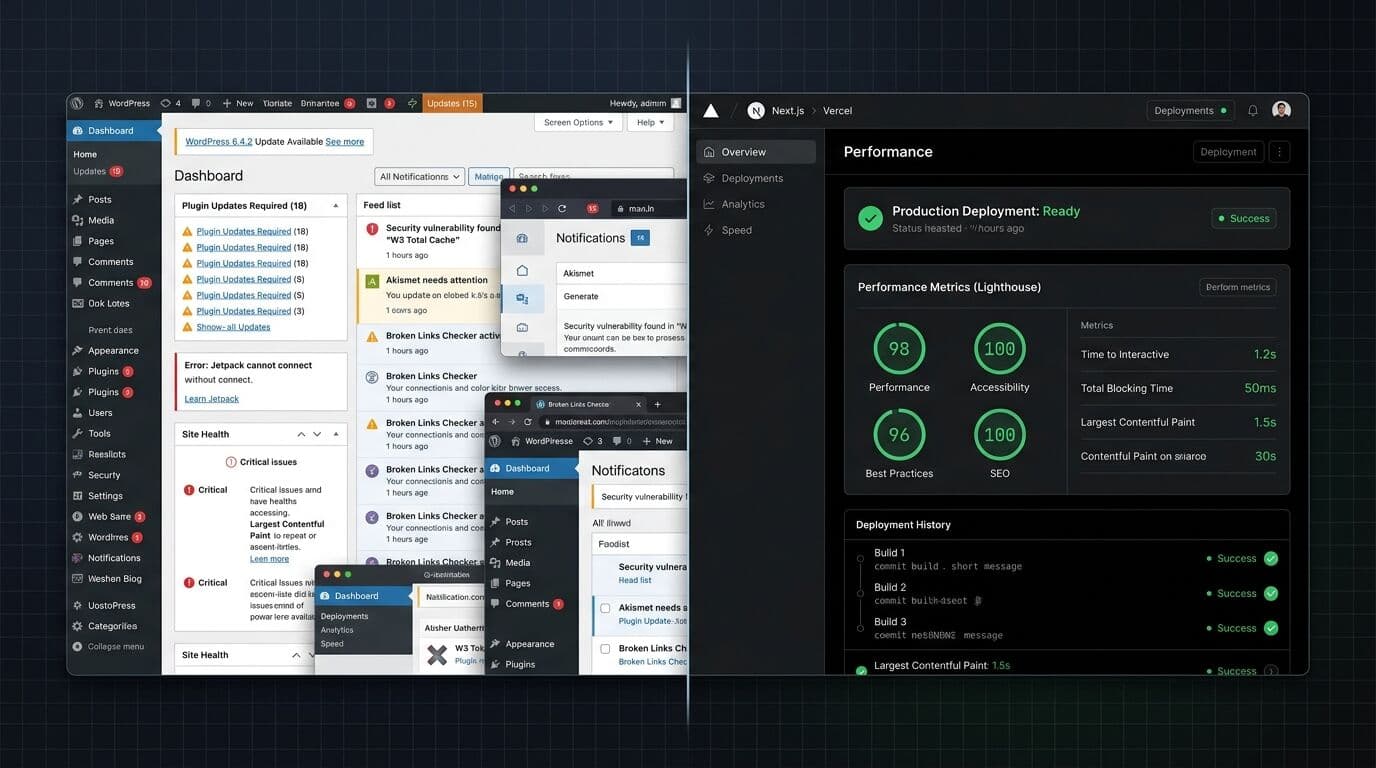
A well-built Next.js site regularly scores 95–100 on Lighthouse performance tests. A typical WordPress site with even modest plugin overhead scores 55–75. I’ve seen heavily customized WordPress setups score in the 30s. For context, anything below 50 is where users start bouncing before the page even loads.
The reason for the gap comes down to how each system delivers content. WordPress builds pages dynamically on the server on every request (unless you’ve configured caching perfectly, which most haven’t). Next.js generates static HTML at build time by default and streams interactive components where needed — a pattern called static site generation combined with React Server Components. The result is pages that load in under a second, even on slower mobile connections.
Studies from Google and Deloitte have found that a 0.1-second improvement in site speed can improve conversion rates by roughly 8%. For a small business doing $10K/month in online revenue, that’s not theoretical.
Who Should Actually Use WordPress (Be Honest)
Here’s where I’ll take a clear position: WordPress is the right call for a narrow set of situations. If you need a basic informational site, you’re non-technical, and you plan to update content yourself without developer help — a managed WordPress setup can absolutely work. Tools like WordPress.com or even a Squarespace alternative might be even simpler.
WordPress also still makes sense for larger editorial teams that have deeply integrated workflows around the Gutenberg editor and don’t want to retrain staff on a new CMS.
But if you’re a freelancer or small business owner who’s already frustrated — already paying for plugins you barely use, already watching your scores tank, already dreading the next update — WordPress is probably costing you more than you think. Not just in money. In time.
(Side note: this plugin bloat problem is one reason headless CMS architectures have grown so fast over the last few years. The concept is simple — your content lives in one place, and your frontend is completely separate. It decouples the editor experience from the performance bottleneck. That’s a bigger conversation, but worth knowing about.)
The Hidden Cost Nobody Talks About: Developer Availability
Finding a good WordPress developer who won’t break your site is genuinely hard. The market is flooded. Quality varies wildly. I’ve seen small business owners pay three different developers to fix problems that the previous developer introduced.
Next.js developers are rarer, but the work is more standardized. React is the dominant front-end framework — about 40% of professional developers use it regularly according to the 2024 Stack Overflow Developer Survey. A Next.js codebase from a competent developer is readable and maintainable by other competent developers. A heavily customized WordPress site with a bespoke theme and 30 plugins? Good luck handing that off.
If you’re thinking about how to actually price and scope a premium website project, the framework choice is one of the biggest levers you have over long-term cost.
A Side-by-Side Cost Comparison
| Cost Category | WordPress (Annual) | Next.js + Headless CMS (Annual) |
|---|---|---|
| Hosting | $420–$2,400 | $0–$240 |
| CMS / Theme / Plugins | $200–$700 | $0–$480 (headless CMS) |
| Security & Maintenance | $200–$600 | $0–$200 |
| Developer Fixes | $300–$1,500 (when things break) | Minimal (architecture is stable) |
| Total Year 1 (excl. build) | $1,120–$5,200 | $0–$920 |
These numbers assume you already have a site built. Factor in build costs, and a custom Next.js site has higher upfront investment — but lower operational drag for years two, three, and beyond.
What the Right Choice Actually Depends On
Budget isn’t the only factor. Or rather — it shouldn’t be the only factor, but it often is when the wrong questions are being asked.
Ask yourself: Who’s updating the content? How often? What’s the site’s job — branding, lead generation, e-commerce? How much does site speed matter to your customer conversion rate? Do you have a developer relationship, or are you doing this alone?
If you’re a freelancer building sites for clients, the shift in how development work gets scoped and delivered is worth paying attention to — it changes which stack you recommend and why.
For most small businesses I’ve worked with who care about performance, want a site that actually loads, and are willing to make a slightly bigger upfront investment — Next.js wins. Not because it’s new, but because the math works and the performance gap is real.
Thirty-one plugins is not a website strategy. It’s a liability.
Frequently Asked Questions
Is Next.js harder to maintain than WordPress?
For non-developers, yes — you’ll need developer help for code-level changes. But day-to-day content updates through a headless CMS like Sanity or Contentful are just as simple as WordPress, sometimes simpler. The maintenance burden on the infrastructure side is dramatically lower because there’s no plugin ecosystem to keep updated and conflict-free.
Can a small business owner update a Next.js site without a developer?
Yes, if it’s set up with a headless CMS. Editors get a clean, purpose-built dashboard for managing content — blog posts, product pages, images — without touching any code. The developer builds the frontend once; the business owner manages content independently after that.
What’s the real difference between Next.js and WordPress for SEO?
Next.js sites typically have faster load times, better Core Web Vitals scores, and cleaner HTML output — all of which are direct ranking signals. WordPress can achieve good SEO with the right setup, but it requires more configuration work (caching, image optimization, schema markup plugins) to compete with what Next.js delivers out of the box.
Is WordPress still worth using in 2025?
For certain use cases, absolutely. Simple informational sites, teams deeply embedded in the WordPress editorial workflow, or projects with tight budgets and no developer relationship — WordPress still works. But for performance-sensitive small business sites where speed and conversion rate matter, it’s showing its age under the weight of its own ecosystem.
What is a headless CMS and does a small business need one?
A headless CMS is a content management system that stores your content separately from your website’s frontend. Instead of WordPress generating both the admin interface and the public-facing pages, a headless CMS handles content only — your Next.js frontend pulls that content via API. Small businesses don’t always need one, but pairing Next.js with a headless CMS gives non-technical owners a clean editing experience without sacrificing performance.
How much does a custom Next.js website cost for a small business?
Realistically, $3,000–$8,000 for a professional custom build, depending on complexity, number of pages, and whether e-commerce or custom integrations are involved. Simpler sites can come in lower. The upfront cost is higher than a WordPress theme, but ongoing operational costs are significantly lower — most Next.js small business sites cost under $50/month to run after launch.


