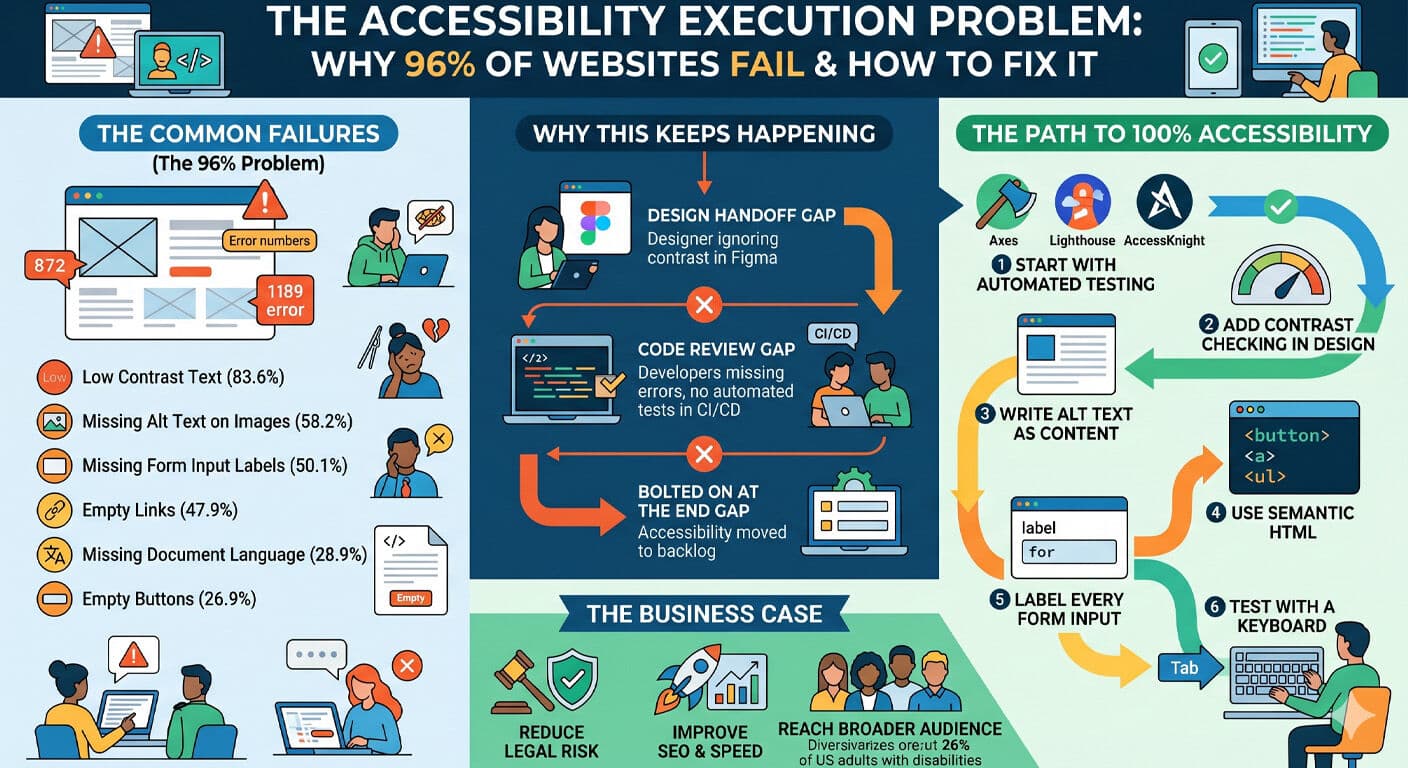
WebAIM’s annual accessibility study audits the top one million websites every year. Their most recent report found that 96.3% of home pages had detectable WCAG 2.1 failures. That number has barely moved in six years of testing.
It’s not a knowledge problem — most developers have heard of WCAG. It’s an execution problem.
Here’s what the data actually shows, why it keeps happening, and what you can do about it today.
The Most Common Failures
WebAIM’s study breaks down exactly which failures are most prevalent. The top six account for the majority of all errors found:
1. Low Contrast Text — 83.6% of pages
Text that doesn’t meet the 4.5:1 contrast ratio for normal text or 3:1 for large text. This affects everyone in bright light, on cheap displays, or with any degree of low vision.
2. Missing Alt Text on Images — 58.2% of pages
Images without alt attributes leave screen reader users with no context. A decorative image should have alt="". An informative image needs a description.
3. Missing Form Input Labels — 50.1% of pages
Placeholder text is not a label. When the field is focused, the placeholder disappears. Screen readers can’t associate unlabeled inputs with their purpose.
4. Empty Links — 47.9% of pages
Links with no text content — usually icon links with no aria-label — give screen readers nothing to announce. “Link” with no destination description is useless.
5. Missing Document Language — 28.9% of pages
The lang attribute on the <html> element tells screen readers which language to use for pronunciation. Without it, the wrong language engine may be applied.
6. Empty Buttons — 26.9% of pages
Same problem as empty links. An icon button without an aria-label announces as “button” with no context about what it does.
Why This Keeps Happening
Accessibility failures aren’t usually caused by developers who don’t care. They happen for three systemic reasons:
It’s not in the design handoff.
Contrast ratios aren’t specified in Figma. Alt text isn’t written in the design. Form labels get swapped for placeholder text to “look cleaner.” By the time code is written, accessibility has already been designed out.
It’s not caught in code review.
Most teams don’t have automated accessibility testing in CI/CD. A linter catches syntax errors. Nothing flags missing alt text or an unlabeled icon button.
It’s bolted on at the end — if at all.
Accessibility gets added to the backlog after launch. The backlog never gets fully addressed. The site ships broken and stays that way.
How to Fix It
Start with automated testing.
Tools like AccessKnight, axe, or Lighthouse catch the mechanical failures — contrast, alt text, labels, language attributes. These are the low-hanging fruit. Automated tools catch about 30–40% of WCAG issues. Run them on every page.
Add contrast checking to your design workflow.
Before a design is finalized, check every text/background combination. Use the WebAIM Contrast Checker or the built-in contrast checker in Figma plugins. Make it part of the definition of done.
Write alt text as part of the content process.
Alt text is content, not a developer task. Every image on your site should have a brief that includes the alt text. Decorative images get alt="". Informative images get a concise description of what’s communicated.
Use semantic HTML first.
The most powerful accessibility tool is also the simplest: use the right HTML element for the job. A button that does something is a <button>. A link that goes somewhere is an <a>. A list of items is a <ul>. Semantic HTML gives you keyboard support, screen reader announcements, and ARIA roles for free.
Label every form input.
Every <input> needs a <label> with a for attribute matching the input’s id. Visually hidden labels are fine for cases where a visible label would break the design. Placeholders are never a substitute.
Test with a keyboard.
Tab through your entire site without touching a mouse. Every interactive element should be reachable, the focus indicator should be visible, and the tab order should match the visual reading order. This catches issues automated tools miss.
The Business Case
Beyond the ethical argument, WCAG compliance has a direct business impact. In the US, the ADA applies to websites under most interpretations. Web accessibility lawsuits filed over 4,000 cases in 2023 alone. Many targeted small businesses with no legal budget to fight them.
More practically: accessible sites are faster, better structured for SEO, and usable by a broader audience. The 26% of US adults living with a disability represent significant purchasing power. Accessibility isn’t a cost center — it’s a competitive advantage.
The 96% failure rate isn’t inevitable. It’s the result of accessibility being treated as optional. The teams that treat it as a baseline — not a feature — are the ones that never have to worry about it later.


